How to copy a Gmail verification code on a computer
Gmail’s Copy code button is only in its apps for Android and iOS, where it began rolling out in September 2026; Gmail on the web does not have it (9to5Google, September 19, 2026, read October 30, 2026). On a computer, open the email, select the code, copy it with ⌘ C on a Mac or Ctrl C on Windows, and paste it into the site. A notifier extension can put the code one click from its notification instead.
By hand, a little faster
- Find it quickly. Gmail lists the newest mail first; a code that is slow to arrive is often in the Updates or Promotions tab, or in Spam.
- Select it in one move. A double-click selects a code without spaces. A code written as
482 913needs a drag, or a double-click on each half. - Paste once. Most sign-in pages split the code into boxes but accept the whole code pasted into the first one.
- Use the newest code. When you ask for a code twice, the first one usually stops working.
On your phone
In the Gmail app for Android or iOS, a message with a code can show a Copy code button under its subject. Google was still rolling it out in September 2026, so not every account has it yet.
With Apple Mail on a Mac
If you add your Gmail account to Apple’s Mail app, Safari on a Mac (macOS Sonoma or later) can offer a code from a recent email as you fill in the code field, the way it does for codes sent by text message.
A word of care
A code is a key to your account for a few minutes. Enter it only on the site you were signing in to, and never because an email or a caller asks you to. A tool that fills codes in for you should do it only on the site that sent the code.
A code one click from its notification
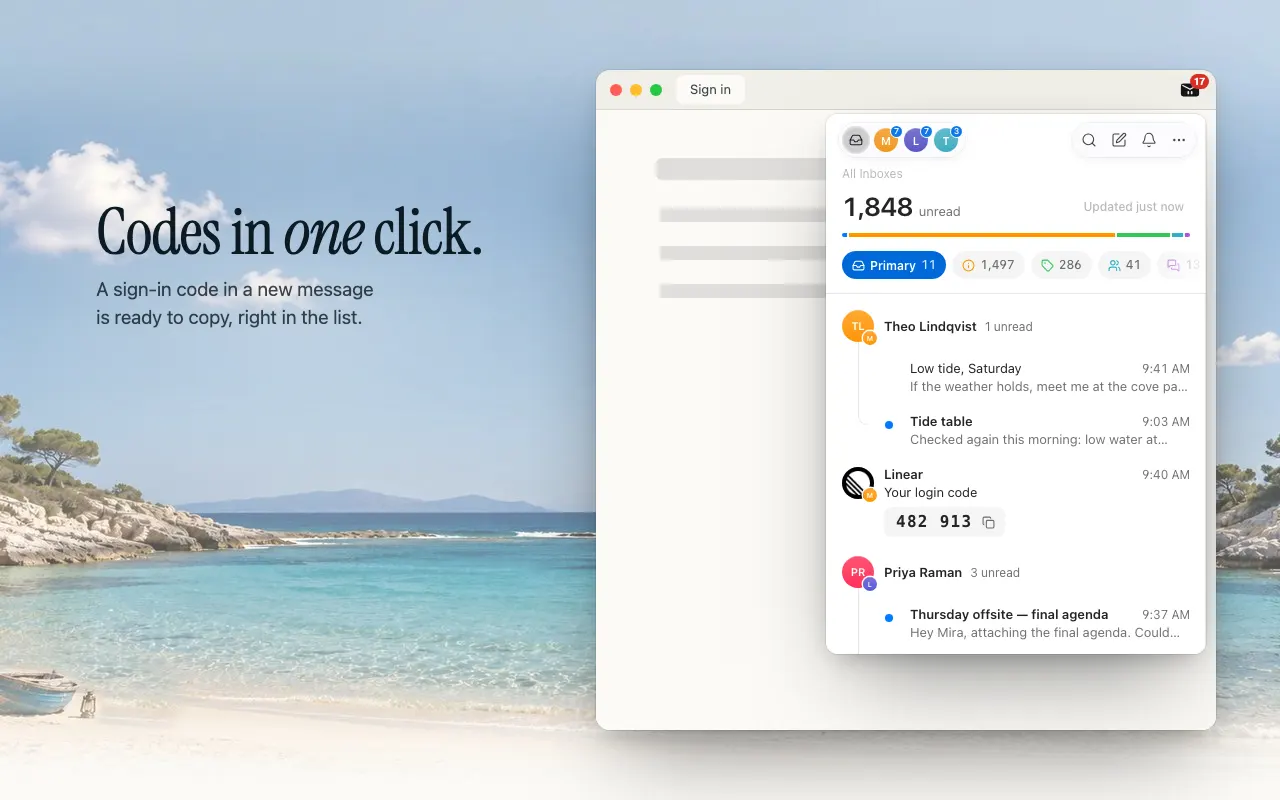
Peekat Email, a free browser extension for Gmail, notices verification codes and sign-in links in new mail from any of your accounts, in any inbox tab, and notifies you of them even while other mail stays quiet.
- The notification shows the code and says Click to copy. A click copies it; nothing is ever copied by itself.
- In the list, the code sits under the subject with a copy button.
- Copied in the toolbar popup, the code also goes into the code field of the page in front, but only when that page is the sender’s own site over
https: a code from github.com fills in on github.com, never on a look-alike, and never in Gmail. - With previews off, the notification says only Verification code; a click still copies it.
 Add to Chrome — free
Chrome Web Store and Edge Add-ons. Other browsers
Add to Chrome — free
Chrome Web Store and Edge Add-ons. Other browsers