Google Mail Checker marks mail unread again? What you can do
Google Mail Checker is Google’s own small extension that shows how many unread messages are in your Gmail inbox on its toolbar icon. Its last update was version 4.4.4, on July 31, 2024. Since August 2026, reviews on its store page, in several languages, report that mail read or deleted in Gmail comes back as unread, or that the count takes minutes to change. To find out whether the extension is the cause, turn it off for a while. To keep an unread count, you can use Gmail’s own tab icon, or another extension.
What people report
Reviews from August to October 2026, in English, Japanese, Polish and Turkish, describe the same few things:
- Mail opened in Gmail is not marked read, or turns unread again a moment later.
- Mail deleted in Gmail comes back, sometimes as new mail.
- The number on the icon is slow to change after mail is read, by several minutes.
- Gmail asks “Leave site?” when the tab is closed or reloaded.
Google has said nothing about it on the listing. Sources: Google Mail Checker in the Chrome Web Store, read October 31, 2026; its reviews, read October 31, 2026.
Check whether the extension is the cause
- Open
chrome://extensions(edge://extensionsin Edge) and switch Google Mail Checker off. Nothing is deleted; you can switch it on again. - Reload Gmail, then read and delete a few messages as usual.
- Reload Gmail again. If the mail stays read and deleted, the extension was the cause. Several reviewers say the problem stopped once they removed it.
If mail still comes back with the extension off, look at other extensions that touch Gmail, and at mail apps or phones that sync the same account.
An unread count without an extension
Gmail can show the unread count on its own tab icon: in Gmail, click the gear, then See all settings → Advanced → Unread message icon → Enable, and Save Changes. It shows only while a Gmail tab is open. (How-To Geek, read October 31, 2026.) For notifications from Gmail itself, see turning on Gmail desktop notifications.
Peekat Email in its place
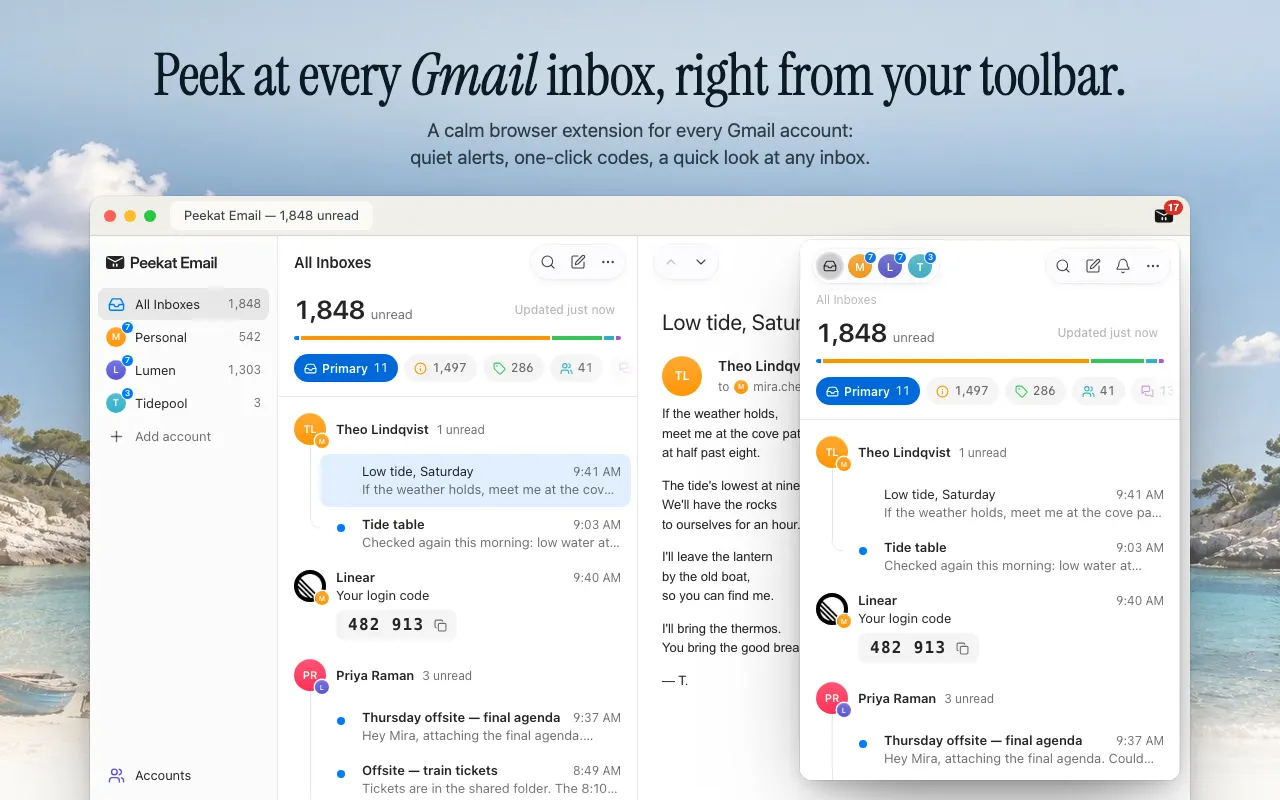
Peekat Email is a free browser extension for Chrome and Edge that checks your Gmail accounts from the browser, with no Gmail tab open. It is made by the Peekat team. It is not made by Google and has no connection with Google or with Google Mail Checker.
What it does in Google Mail Checker’s place:
- A count on the toolbar icon. At first it counts only mail that needs you. For the number Google Mail Checker showed, every unread message, choose Settings → Badge → All unread.
- Every Gmail account signed in to your browser, personal and Workspace, with no limit. Each keeps its own count, and All Inboxes adds them up.
- Notifications only for mail that needs you: new mail in Primary or in a label you made, sign-in codes and links, and people you mark Always notify. Promotions, Social, Updates and Forums are counted and listed, silently.
- Read, archive or trash in place. These act on the message in Gmail itself.
What it does not do:
- Clicking the icon opens Peekat’s list, not Gmail. Gmail is one more click away: Open in Gmail.
- It does not write or reply itself. Reply in Gmail and Write a new message open Gmail’s own window.
- It works with Gmail only, including Google Workspace, and only in Chrome and Edge (and browsers that install from the Chrome Web Store, such as Arc and Brave). The Firefox version is in review.
- It does more than count. If a number is all you want, Gmail’s own tab icon may be enough.
Google Mail Checker is a product of Google. Its name is used here only to describe it; Peekat Email is not made or endorsed by Google.
 Add to Chrome — free
Chrome Web Store and Edge Add-ons. Other browsers
Add to Chrome — free
Chrome Web Store and Edge Add-ons. Other browsers