Gmail is ending POP fetch and Gmailify: what changes and what you can do
Gmail is removing two ways of bringing another mailbox into your Gmail: “Check mail from other accounts”, which fetched mail from another provider over POP, and Gmailify. Google’s notice says: “After the first quarter of 2026, this feature no longer supports new users. Existing users can still use the feature until January 2027.” Mail already brought in stays in Gmail. Google suggests forwarding from the other provider, or adding the account to the Gmail phone app. If your other accounts are Gmail or Outlook.com, a browser notifier can also show them side by side.
Last checked November 4, 2026, against Google’s notice, Learn about upcoming changes to Gmailify & POP in Gmail.
What POP fetch and Gmailify did
- Check mail from other accounts (POP fetch) was a setting in Gmail on a computer. Gmail signed in to another mailbox, for example an ISP or Yahoo address, and copied its new mail into your Gmail inbox every so often.
- Gmailify linked another account to Gmail and gave its mail Gmail’s own features: in Google’s words, spam protection, better email notifications on mobile, inbox categories, and faster search with advanced search operators.
What ends, and when
- “Gmail will no longer support checking emails from third-party accounts through POP”, and the “Check mail from other accounts” option will no longer be in Gmail on a computer.
- Gmailify’s features will no longer apply to third-party accounts.
- New users: not supported after the first quarter of 2026. Existing users: until January 2027. Google’s notice gives no exact day.
- Messages synced before the change stay in Gmail. Gmail’s one-time import of mail and contacts on the web stays too, but it does not keep syncing.
Nothing changes about Gmail itself: other apps can still connect to Gmail over POP or IMAP, and the Gmail phone app can still hold Yahoo and Outlook accounts.
What Google suggests
- Forward from the other provider. To have new mail land in your Gmail inbox as POP fetch did, turn on automatic forwarding in the other mailbox’s settings. Each provider documents its own steps, and some limit forwarding on free plans.
- Add the account to the Gmail app on Android, iPhone or iPad. It connects over IMAP, so you can keep reading and sending from that account. See Google’s steps for adding another account to the Gmail app, read November 4, 2026.
- Work or school accounts: an administrator can move mail into Google Workspace with Google’s data migration service, read November 4, 2026.
Other options
- Use the other provider’s own app or website. Most providers have a web mail page and phone apps with their own notifications. It means one more place to look, but nothing depends on Gmail.
- Use a desktop mail app that holds several accounts over IMAP, such as the mail app that comes with your computer.
- If the other account is Gmail or Outlook.com, you may not need to bring its mail into one inbox at all: keep each account where it is, and see all of their new mail in one place. That is the next section.
If your other accounts are Gmail or Outlook.com
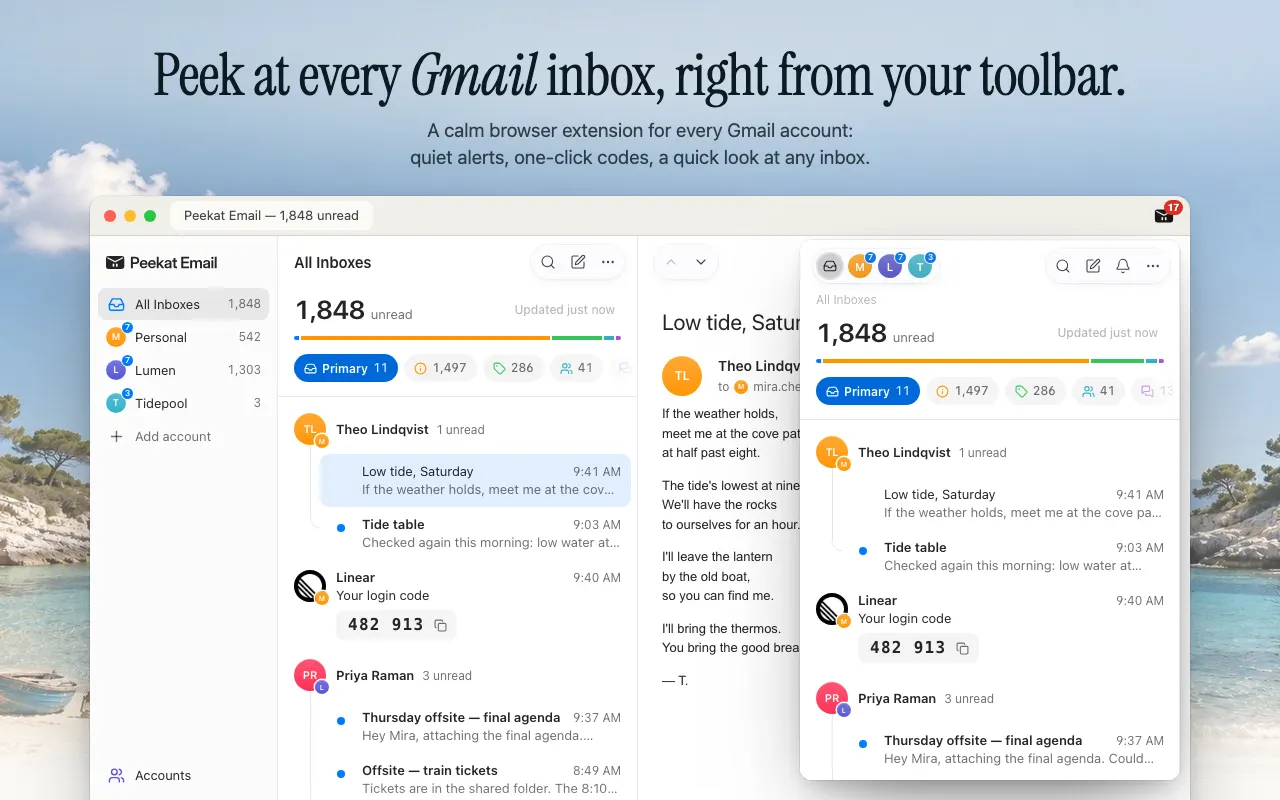
Peekat Email is a free browser extension for Chrome, Edge and Firefox. It finds every Gmail account signed in to your browser, personal and Workspace, and checks Outlook.com, Hotmail and Live accounts beside them, in beta (Chrome and Edge). New mail from all of them shows in one list, with quiet notifications for mail that needs you.
- Sign in to each Gmail account in the same browser: in Gmail, click your profile picture, then Add another account. Peekat picks each one up by itself.
- For an Outlook.com account, open Peekat’s Accounts page and choose Add Outlook. See Outlook in Peekat Email.
- All Inboxes lists new mail from every account together, and each account keeps its own count. You can read a message, archive it, or mark it read from the list.
What it does not do, plainly:
- It does not merge mailboxes or import mail. Each account’s mail stays in that account; Peekat shows it and acts on it there.
- It does not support Yahoo, ISP or other IMAP and POP mailboxes. For those, use forwarding or the provider’s own app, above.
- It does not write or reply itself; Reply in Gmail opens Gmail’s own window.
Your mail goes from Google or Microsoft straight to your browser and stays on your device. There is no Peekat account to make. More in notifications for several Gmail accounts.
Questions
Why does “Check mail from other accounts” no longer work for me?
If you set it up after the first quarter of 2026, Gmail no longer supports it for new users. If you had it before, it keeps working until January 2027, per Google’s notice. A fetch that stopped earlier than that may be a sign-in problem at the other provider; check its password and POP settings.
Will I lose the mail Gmail already fetched?
No. Google says all messages synced before the change stay in Gmail.
Can I still read my Yahoo or Outlook mail in Gmail?
In the Gmail phone app, yes: add the account there. In Gmail on a computer, only by forwarding new mail from that provider into Gmail.
What is the closest replacement for Gmailify?
Google points to the Gmail app’s IMAP connection, which reads and sends but does not apply Gmail’s spam filter or categories to the other account. For notifications from several Gmail or Outlook.com accounts on a computer, a notifier such as Peekat lists them together.
 Add to Chrome — free
Chrome Web Store and Edge Add-ons. Other browsers